
Traffic Court Records in Pitkin County
State traffic tickets in Pitkin County land in County Court. Aspen, Basalt, and Snowmass Village handle their own code citations in municipal court. A city police officer can write under either system. So the agency name alone tells you nothing about custody. What settles it is the court name and the response instructions printed on the ticket. A Pitkin County traffic court record may hold the charge. It may also hold every setting, the plea, the disposition, and court costs. The free Judicial docket lists scheduled state hearings only. It is not the full record, and not a payment balance. Treat it as a schedule, nothing more.
Pitkin Traffic Filing Numbers
Pitkin County Court logged 337 traffic filings in FY2024, per the official statistics. Filings are not convictions. The docket broke down as 134 DUI cases, 6 DWAI, 187 motor-vehicle matters, 6 suspension, revocation, or denial cases, and 4 habitual-traffic-offender matters. No non-record municipal appeals were reported.
The figures describe County Court workload. They do not include every municipal citation.
How to Look Up a Traffic Ticket
State tickets are easiest to find when you search Pitkin by class T, year and sequence, or by party plus date. The location code for Pitkin is 049. Before you pay anything through the Colorado court payment system, confirm the court allows payment on that case. A calendar result is not a payment lookup.
- Read the court name and printed appearance or payment date.
- For state court, search the Judicial docket using Pitkin and the ticket data.
- For a city citation, use that municipal court's page or clerk.
- Call or visit the correct counter when no case-level lookup exists.
- Confirm the deadline, hearing, and allowed response before acting.
The Pitkin clerk sits at 506 E. Main Street, Aspen, reachable at 970-925-7635. Municipal numbers: Aspen 970-429-2680, Basalt 970-927-4701, and Snowmass Village 970-923-3777.
Pitkin County Traffic Ticket Courts
Venue on the citation tells you where to search. A state-law ticket in Pitkin County lands in County Court under a T case number. Aspen Code citations stay with Aspen Municipal Court. Basalt Code cases remain municipal too. State-law citations from either side of town route through the judicial district. Snowmass quick links split municipal, state/Pitkin, and parking tickets into separate buckets.
A state T case belongs to the Pitkin Combined Court clerk. Citations from Aspen, Basalt, or Snowmass Village belong with each city clerk. The wrong counter will not hand you the other court's full file.
Finding Your Traffic Court Date
Your printed ticket sets the appearance date. That date stands unless a later court order resets it. Pull up the state docket result and read it closely. For a Court Trial or any other hearing, it lists the date and time. It also shows how long it runs, the Pitkin County location, the appearance type, and the courtroom. When you jot down the case number, keep the state format intact: year, T class, then sequence, as in 2026T123.
| Case number | Year, T class, and sequence for a state case. |
|---|---|
| Date and time | The scheduled appearance, subject to later court action. |
| Hearing type | Court Trial or another event label. |
| Appearance | In-person or remote mode when populated and authorized. |
| Room | Courthouse and courtroom listed for the setting. |
Even when the docket shows a virtual link, that link alone does not permit a remote appearance, so confirm any reset or same-day change with the clerk.
Pitkin Citation Search Fields
Think of the state docket interface as a hearing finder. It wants a county and a date, and it can narrow results by judicial officer. Buttons for Find Dockets, Clear Results, Export Results, and Printable Version let you work with a broader set of matches. Already know a T case number? You can search it by its structured parts instead.
| Field | Use | Format |
|---|---|---|
| County | Required venue | Select Pitkin |
| Date | Required calendar point | Choose the expected hearing date or range |
| Judicial officer | Optional narrowing | Select an available officer |
| Case | Known state citation | Year, T, sequence |
When no result appears, check the municipal court before assuming the case is absent.
Paying or Contesting a Ticket
Let the ticket itself govern. It states your choice and the deadline for making it, so follow those instructions exactly. Paying can resolve the matter, but it may carry plea consequences, while contesting means using the response or appearance method that this court names. Pitkin County publishes no single universal deadline, and County Court posts no official deferred-disposition rule.
| Pay | Contest |
|---|---|
| Confirm prepayment is allowed. | Use the named plea or hearing route. |
| Use the correct court payment channel. | Respond by the printed appearance date. |
| Keep the receipt and check the case status. | Confirm the trial or other setting with the clerk. |
Do not ignore the response date. Failure to appear can create added court action. Consequences depend on the case, so contact the named court promptly rather than relying on a generic rule.
Pitkin Traffic Payment Screen
Pitkin tickets paid online run through a separate state screen that carries Pitkin location code 049. Paying there is not a docket lookup, and it settles nothing about whether a ticket qualifies for payment before a court date. The official online payment source displays the court's payment channel itself.
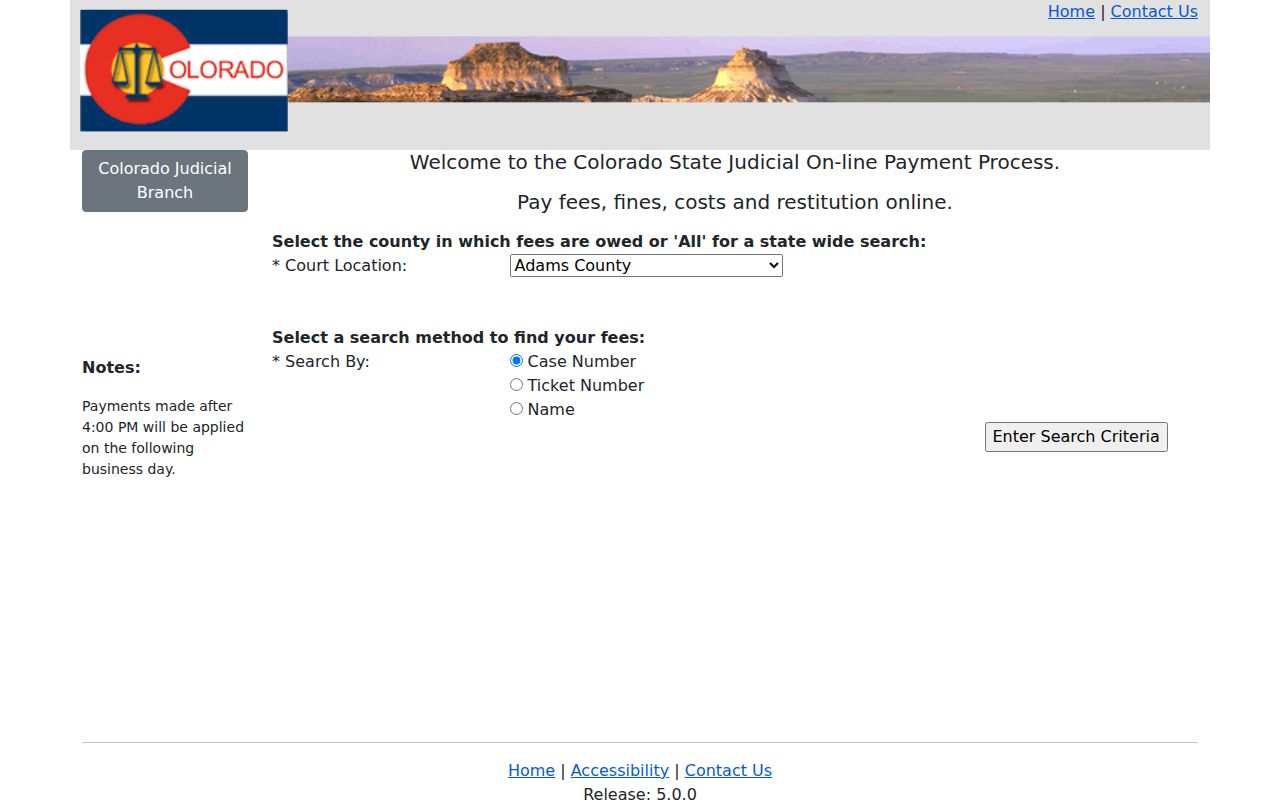
Match the case and court before submitting funds, then keep proof of the transaction.
Court Traffic Record vs Driver Record
Two different offices keep two different files. The Pitkin clerk of court holds the traffic case itself: the citation, hearings, plea, disposition, and court costs. Colorado's licensing agency holds the driver record instead, covering credential status, reported convictions, points, withdrawals, and administrative stops. The court docket record stays the focus here.
| Court traffic record | Driver record | |
|---|---|---|
| Custodian | State or municipal court clerk | Colorado licensing agency |
| Shows | Citation, settings, plea, disposition, costs | Credential status and reported driving events |
| Request | Docket, ROA, or clerk copy | State driver-record channel |
One system never substitutes for the other. Basalt camera matters are expressly zero-point civil infractions, and they are not reported to the state driver file at all.
Pitkin Aspen Traffic Route
Aspen Municipal Court publishes a current docket PDF along with an archive. Sessions fall on the first and third Wednesdays, plus a fifth Wednesday when the month has one, at 9:00 a.m. The calendar may list IT, INT, and CN formats, citation data, a charge description, fine, officer, and issue date. Still, it is not a full ROA.
That posting is the official route to Aspen's docket. Traffic school there demands five clean years, clerk confirmation, a $100 city payment, and completion within 90 days of the ticket date. The municipal document center carries the current fine materials.
The schedule helps you spot payment terms and mandatory appearances, yet the actual court record still comes from the clerk. Parking runs on its own track entirely, through a separate parking payment and dispute route. A parking dispute generally must begin online within ten days. Certain serious categories instead require Municipal Court signup in person.
Pitkin Basalt Camera Notices
Basalt turned on four Highway 82 automated corridors in 2026. Each mailed notice is a $40 civil penalty, verified by police, with no points attached. You get 45 days to pay. Skip the deadline. The notice can then ripen into a final liability order, then go to collection. The town's online payment and hearing tools still carry a "Coming Soon" label.
Until those tools go live, lean on direct contact. The Town of Basalt source lists the current municipal entry points. Town Hall plus the published assistance line are the fallback for a Basalt docket question. For session dates, the Basalt municipal calendar is the right stop.
Know what that calendar gives you, though. Its date, keyword, past-event, list, week, month, print, and calendar controls cover the basics. They will find a court session. They will not pull the citation's full ROA.
Pitkin Snowmass Ticket Split
Snowmass Village sorts its tickets three ways. There are municipal tickets, Colorado state and Pitkin tickets, and parking citations. The Municipal Court convenes the third Wednesday at 9:00 a.m. That schedule holds unless the judge finds no pending docket items that month. The village offers no case-level public docket search. When the ticket link leaves your question open, call the court clerk directly.
One caution about the Snowmass government directory. It is a general public-record portal, not a court docket. The summons and the municipal clerk hold the actual court record.
Fees and Copies
A Pitkin state traffic record costs money to pull. The clerk charges 25 cents per page. A name search runs $5, and certification or exemplification plus copying is $20 per document. Party copies cap at $15 no matter the page count. That cap never applies to nonparties, and off-site retrieval runs at actual cost.
| Item | Fee | Note |
|---|---|---|
| Plain copy | $0.25 per page | Page count affects the total. |
| Name search | $5 | Use the case number when known. |
| Certified or exemplified copy | $20 per document | Copy fees also apply. |
Municipal fees and ticket fines follow whatever schedule the issuing court posts today. Never carry one city's fee over to another court.
Pitkin Traffic Record Requests
For a Ticket, ROA, Disposition/Sentence Order, or certified state-court copy, use the state Record/Document Request Form. The form promises a response within three business days in ordinary circumstances. Retrieval, redaction, or restricted material can stretch that timeline. Municipal records are different. Those go to the city clerk. The Pitkin state clerk cannot certify Aspen, Basalt, or Snowmass Village files.
Pitkin Traffic Date Check
Check three things before any court date. Look at the printed ticket, the newest court notice, and the live docket. A reset leaves old calendar entries behind as history. Closure notices can shift operations too. If the records disagree, the court controls. Call the clerk named on the citation, and keep proof of every payment, filing, or request.